
Languages
Icon Map Pro shows its own text in English, German, Spanish, French or Portuguese. It follows the language of the Power BI report, so there is nothing to set in the visual.
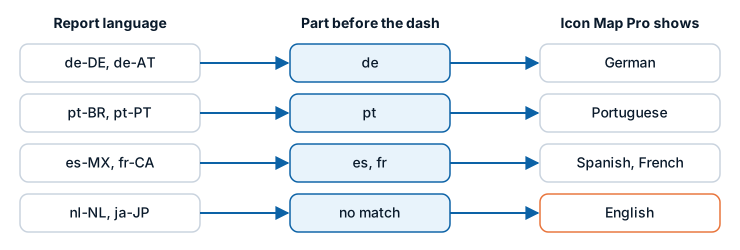
Supported languages
| Language | Shown when the report language starts with | Examples |
|---|---|---|
| English | Anything not listed below | en-US, en-GB, nl-NL, ja-JP |
| German | de | de-DE, de-AT, de-CH |
| Spanish | es | es-ES, es-MX |
| French | fr | fr-FR, fr-CA |
| Portuguese | pt | pt-BR, pt-PT |
How the language is chosen
Icon Map Pro reads the language Power BI reports for the report. It uses only the part before the dash, so every regional variant of a supported language gets that language. A language with no translation shows English.
The language is read once, when the visual is created. If you change the language of Power BI, reload the report to see the visual follow.
To change the language Power BI uses:
- Power BI Desktop: File > Options and settings > Options > Regional Settings.
- The Power BI service: Settings > General > Language, or the language of your browser when the setting is left on the default.
What is translated
- The names and descriptions of the field wells in the Build pane.
- The cards, groups, settings and options in the Format pane.
- The map controls, their tooltips and the legend.
- Messages on the map, the landing page and the "What kind of map are you making?" guide.
- The dialogs the visual opens, including the Icon Map Catalog dialog.
The Layer Manager, Basemaps and Browse ArcGIS dialogs follow the same language. That includes the layer names, line styles and counts in the Layer Manager, the style editor's property names and layer types, the upload window, and the default titles of the legend and the layer control.
If one piece of text has no translation yet, that text shows in English and the rest stays in your language.
What is not translated
- Your data. Field values, tooltips and labels show whatever your report holds.
- Numbers and dates. Most follow the browser or operating system settings, not the report language. Counts in the Layer Manager, and sizes and coordinates in the upload window, follow the report language.
- Place names on the basemap. These come from the basemap, not from the visual's translations. On Icon Map styles that have several languages, the Language setting starts on Report language, so place names follow the report when it is in German, Spanish, French or Portuguese, and are in English otherwise. See Icon Map basemap styles.
- A small number of messages, which always show in English. Examples are the note under Maximum data rows and the message shown when a basemap needs the Legacy engine.
Links to this documentation
When the visual opens a page on icon-map.com, such as a layer's guide from the "What kind of map are you making?" guide or the Layer Manager, it adds the report's language to the link. The documentation opens in that language where a translation is published, and in English otherwise. You can change the language of a documentation page with the menu at the top of the page.