Purchasing FAQ
Answers to the questions we are asked most often about buying, paying for and assigning Icon Map Pro licenses.
Buying
Where can I buy Icon Map Pro?
Per user licenses are sold through Microsoft AppSource. Other license types are bought from Icon Map. Check which you need on the License types page, and follow the steps in Purchasing.
Is there a free trial?
Yes. A free developer license lets you use all of Icon Map Pro for up to 6 months in Power BI Desktop and when editing reports in the Power BI service. To share a report with readers before you buy, you can request a 2-week publish trial. See Free trial and developer license.
Do you support Power BI Embedded, Publish to web or Power BI Report Server?
Yes. Microsoft's user licensing does not work in these environments, so they use a license key. See License types, or contact sales@tekantis.com.
Do I need a license key?
Only when user licensing is not available or not what you bought, for example in Power BI Embedded or Publish to web, or with a usage-based license. Keys are not provided for per user licenses bought through AppSource. See License keys and activation.
I'm building a solution to deploy to a customer
Licenses need to be bought for the tenant the report will be deployed to. If you do not have admin access to that tenant, the customer may need to arrange the purchase.
You may also need licenses for the tenant the reports are built in, if it is not the customer's tenant.
What currencies can I pay in?
You are charged in the currency of your payment profile, which is usually your local currency. Prices are set in US dollars and converted to local currency by Microsoft.
I receive an error when trying to purchase Icon Map Pro
Contact Microsoft Store purchases support first, and keep us in the loop so that we can help where we can.
A spinning wheel on the plans page of AppSource can mean that Icon Map Pro is not available to buy in your region through AppSource. Contact us and we will look for another route to purchase.
Paying
Can I pay by invoice?
Most organizations can pay by invoice during the purchase, but Microsoft may need to enable it. More information on invoice purchasing is available on Microsoft Learn.
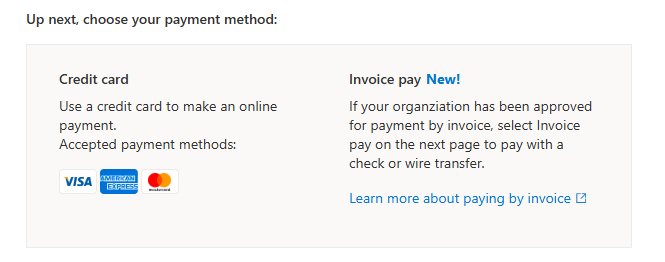
If your billing account type is Microsoft Customer Agreement (MCA), request to pay by wire transfer:
- You must be a billing admin on your tenant.
- Go to your Billing accounts page in the Microsoft 365 admin center.
- Select the billing account. Check that Billing account type is "Microsoft Customer Agreement". If it is "Microsoft Online Subscription Agreement", follow the steps further down.
- Select the Billing Profiles tab and select your profile.
- At the bottom, select Request approval to pay by wire transfer.
- If you are eligible, the page takes you through the next steps. The standard eligibility rules are a minimum spend of $6000 over the last 3 months, and at least 6 months as a Microsoft customer.
- If you are not eligible you are told immediately, and your only option is to pay by credit card.
If your billing account type is Microsoft Online Subscription Agreement, contact Microsoft support to see if you are eligible. Follow these steps exactly, or you may be routed to the wrong support team:
Go to the Microsoft 365 admin center.
Select the ? icon in the top right corner.
Type this into the support chat: "Change my payment method in Microsoft AppSource to enable payment by wire transfer (Invoice Pay)".
Select the Contact Support button that appears.
Choose Email as the support method.
In the description, enter:
"I wish to purchase Icon Map Pro via Microsoft AppSource: https://appsource.microsoft.com/en-us/product/power-bi-visuals/tekantislimited1706613112857.iconmap_pro?tab=Overview
This is a Power BI Custom Visual supplied by Tekantis Limited. The only available payment method is currently credit card, and we would like to enable Invoice Pay on our tenant."
Submit the request.
Microsoft has more information on paying by wire transfer on Microsoft Learn.
How can I add a purchase order number to the purchase?
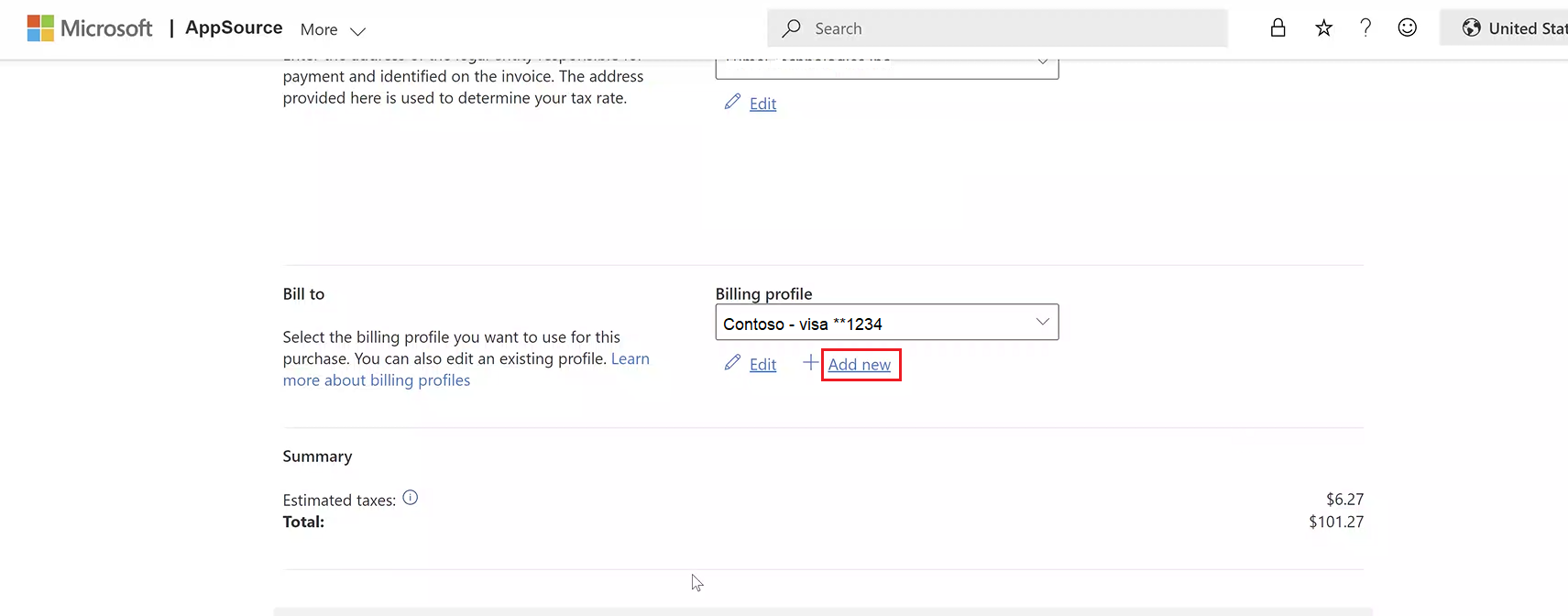
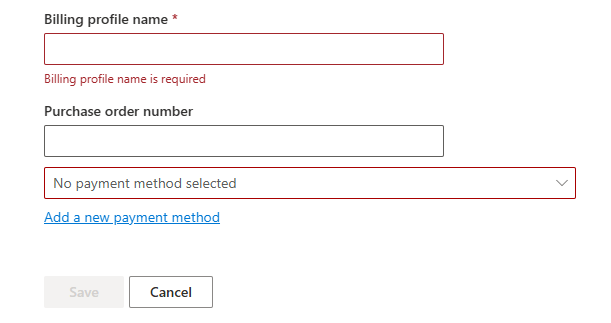
You can add a purchase order number to both credit card and invoice payments. On the final stage of the AppSource payment process, select Add New under the billing profile. You are then given the option to enter a purchase order number.
Assigning licenses
How do I assign licenses?
In the Microsoft 365 admin center. The Assign licenses link on the purchase confirmation takes you to the right page. Select the Icon Map Pro entry, select Assign licenses, enter the email addresses or group names, and select Assign. You may need an administrator to do this. The steps, with pictures, are in Purchasing.
Once a license is assigned, you may need to restart Power BI Desktop, or sign out of and back in to the Power BI service.
Who can assign licenses after purchase?
If the person who bought the license is a tenant admin, all tenant admins can assign licenses. Otherwise only the purchaser can assign them to other users.
Do I need to be an admin to assign licenses?
No. Once you have bought a Power BI visual through AppSource you get access to the Microsoft 365 admin center, even if you are not an admin. You can only see and manage the subscriptions you bought.
Do I need to assign a license to myself?
No. A license is assigned to the purchaser automatically.
After I purchase Icon Map Pro, how long does it take to apply?
The license should be available after a few minutes.
If a license was assigned to you a moment ago, refresh the report:
- In the Power BI service, press F5.
- In Power BI Desktop, close and reopen it.
If the license is still not available, wait a while and try again. It can take up to five minutes. If it still does not apply, see License keys and activation.
Installing and canceling
How do I install Icon Map Pro?
From Microsoft AppSource inside Power BI, with Get more visuals. See Add Icon Map Pro to a report.
How do I cancel my license?
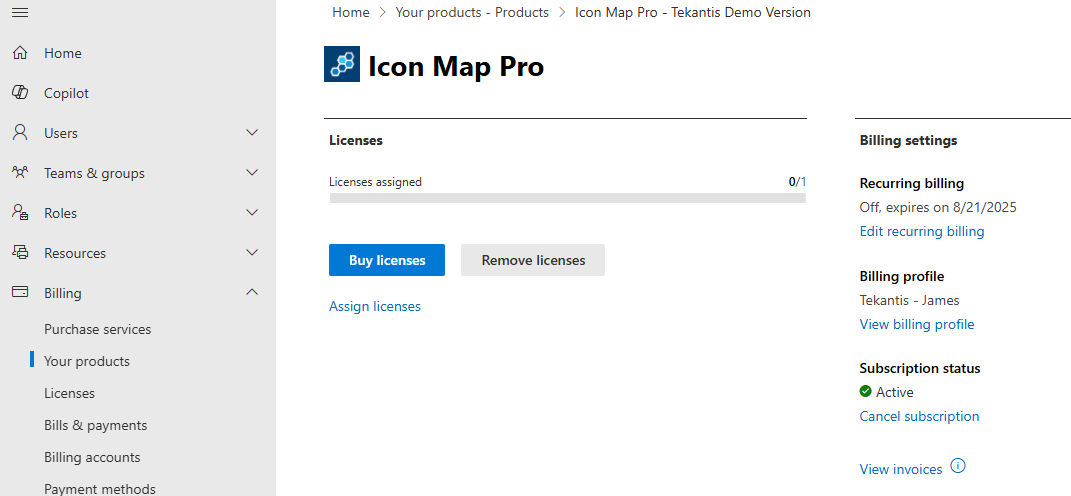
Cancel the subscription from the products section of the Microsoft 365 admin center, with the Cancel subscription button.