
License types
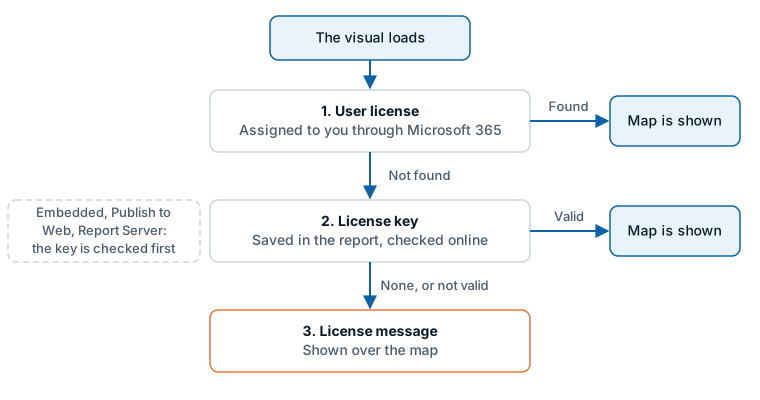
Everyone who creates or views a report that contains Icon Map Pro needs to be covered by a license. Which type you need depends on where the report is used.
Choose a license
| Where the report is used | License type | How it is applied | How to buy |
|---|---|---|---|
| Power BI Desktop and the Power BI service | Per user | Assigned to people or groups in Microsoft 365. No key | Microsoft AppSource |
| Any environment, any number of users | Usage-based | License key | Icon Map customer portal |
| Power BI Embedded | Usage-based | License key | Customer portal, or sales@tekantis.com |
| Publish to web | Usage-based | License key | Customer portal, or sales@tekantis.com |
| A whole Fabric capacity | Capacity | License key | sales@tekantis.com |
| A whole organization | Enterprise | License key | sales@tekantis.com |
| Power BI Report Server | Based on the size of the Report Server estate | License key | sales@tekantis.com |
| US government (GCC) and regional clouds | Contact sales | License key | sales@tekantis.com |
| Trying it out or building reports | Free developer license | License key | Free trial and developer license |
Pricing and details of the plans are on the pricing page of the customer portal.
Per user
For reports used in the Power BI service (powerbi.com or Microsoft Fabric) and in Power BI Desktop. Each person who views or creates a map needs a license. Licenses are bought through Microsoft AppSource and assigned to specific users or to Microsoft Entra groups.
- Licenses can be bought monthly or annually. Annual purchases include one month free.
- Bulk discounts apply depending on how many licenses you buy. The plans are listed on Microsoft AppSource.
- No license key is involved. Power BI tells the visual that the signed-in user has a license.
For government, large enterprise deployments or unlimited usage, contact sales@tekantis.com.
See Purchasing for the steps, and the Purchasing FAQ for assigning licenses and paying by invoice.
Usage-based
Unlimited users. The price is based on the number of times data is loaded into the visual. The license is a key that you add to the report, so it works in every environment, including the ones where Microsoft cannot provide user licenses.
Usage-based licenses are bought in the Icon Map customer portal. See buying a license in the portal.
Capacity and enterprise
- Capacity: license an entire Fabric capacity for unlimited usage. Pricing is based on the capacity SKU.
- Enterprise: license an entire organization for unlimited use. Pricing is bespoke.
Contact sales@tekantis.com.
Power BI Embedded
Power BI Embedded lets organizations embed reports in a web portal or application using the Power BI Embedded SDK. Microsoft's user licensing does not work there, so Icon Map Pro uses a usage-based license and a license key. Contact sales@tekantis.com for further information.
Publish to web
Publish to web makes a report available on the web without a sign-in, as a direct link or embedded in a web page. Icon Map Pro uses a usage-based license and a license key there. Contact sales@tekantis.com for further information.
GCC (US government cloud) and regional clouds
Microsoft's licensing service does not support GCC or regional clouds such as China. You can buy and assign licenses through AppSource in these environments, but the visual cannot validate them.
For these environments, do not buy standard licenses through AppSource. Contact sales@tekantis.com instead.
Power BI Report Server
Microsoft does not support user licenses on Power BI Report Server. Use a usage-based license, or contact sales@tekantis.com for on-premises licensing, including license keys for servers with no internet access. See Power BI Report Server (on-premises).
The Icon Map Catalog
The Icon Map Catalog is available as an add-on to an Icon Map Pro license. See Icon Map Catalog layers.