
How Icon Map for Fabric is licensed
Icon Map for Fabric is licensed to places in your Microsoft Fabric estate, not to people. Once a license is assigned to your organization, a capacity or a workspace, every Icon Map item there is covered, for everyone who opens it. There is no license key to type in.
The short version
- Buy a plan. Usage plans are bought online in the Icon Map portal. Capacity and enterprise plans are arranged with our sales team. See Buying Icon Map for Fabric.
- Assign it. The account owner or a license manager chooses where the license applies: the whole organization, one or more capacities, or one or more workspaces. See Assigning a license.
- Use it. Everyone who opens an Icon Map item in an assigned place is licensed, editors and viewers alike.
- Or try it first. A free 30-day trial covers one workspace. See Free trial.
Icon Map for Fabric has no free tier. Without a paid license or a trial, an Icon Map item opens with a message asking for a license, and the map cannot be used. Your maps and data are never changed or deleted, and they work again as soon as a license is in place.
Plans at a glance
| Plan | What it covers | How to buy |
|---|---|---|
| Usage plan (Tier 1, 2 or 3) | A monthly allowance of credits, shared by Icon Map for Fabric and the Icon Map Pro and Icon Map Slicer visuals for Power BI | Online in the Icon Map portal, by card or on invoice |
| Capacity plan | Unlimited use on one or more named Fabric capacities, with no credit allowance | Contact sales |
| Enterprise agreement | Unlimited use across your organization, or a custom scope | Contact sales |
| Microsoft Marketplace | Usage plans billed through your Microsoft account | Coming soon |
Commercial datasets from the Icon Map data store are bought separately. See Buying Icon Map for Fabric and Commercial data in Fabric.
A usage plan is shared by every Icon Map product, so an organization that already has one does not need a second plan for Fabric. Its owner assigns it in Fabric as described in Assigning a license. Per-user licenses for Icon Map Pro and Icon Map Slicer bought on Microsoft AppSource cover Power BI only.
Where a license applies
A license does nothing until it is assigned. Nothing is assigned automatically, including enterprise agreements, so after you buy, the owner or a license manager decides where it applies.
| Assigned to | Covers |
|---|---|
| The whole organization | Every capacity and workspace in your Microsoft Entra tenant |
| A capacity | Every workspace on that Fabric capacity |
| A workspace | The items in that workspace |
If an item is covered in more than one way, Icon Map uses one license, chosen like this:
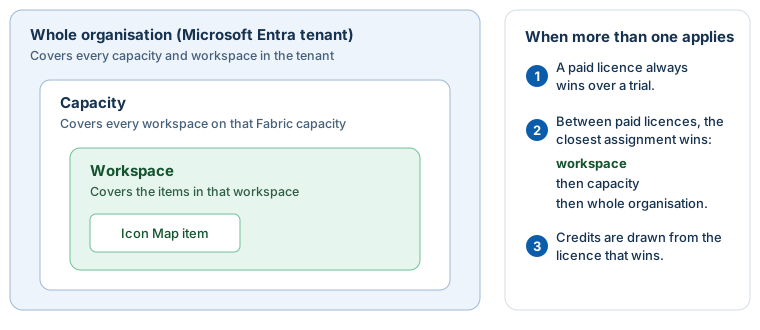
Credits for the item are drawn from the license that wins. This lets you, for example, give a busy project workspace its own usage plan while the rest of the organization uses another.
Who manages licenses
Licenses belong to an account in the Icon Map portal. Each person on the account has one of three roles:
| Role | What they can do with licenses |
|---|---|
| Owner | Everything: buys plans, sees billing, manages users, and chooses where every license applies |
| License manager | Chooses where every license on the account applies, including licenses added later, changes credit modes and buys data; no billing |
| Member | Uses the licenses and can see them in the portal; cannot change anything |
A license manager role covers all the licenses on the account. If two parts of your organization need to manage their licenses separately, use two accounts. See Account roles.
In Fabric, owners and license managers see Manage licenses on the ribbon and in license messages. Everyone else sees Use a license, which shows them who to ask.
What a license includes
| Usage plan | Capacity plan | Enterprise agreement | Trial | |
|---|---|---|---|---|
| Create, edit, view and share maps | Yes | Yes | Yes | Yes, in one workspace |
| Publish and embed maps | Yes | Yes | Yes | No |
| Icon Map Catalog: basic datasets | Included | Included | Included | Included |
| Icon Map Catalog: standard and premium datasets | Charged in credits per layer session | Standard included; premium included from F32 | Included | Map tiles only |
| Commercial datasets | Bought separately | Bought separately | Bought separately | Sample preview |
Catalog access can be adjusted in your agreement. See Access tiers for how the catalog tiers work.