
Languages
Icon Map Lite shows its own text, and the place names on its built-in world map, in English, German, Spanish, French or Portuguese. It follows the language of the Power BI report, so there is nothing to set in the visual.
Supported languages
| Language | Shown when the report language starts with | Examples |
|---|---|---|
| English | Anything not listed below | en-US, en-GB, nl-NL, ja-JP |
| German | de | de-DE, de-AT, de-CH |
| Spanish | es | es-ES, es-MX |
| French | fr | fr-FR, fr-CA |
| Portuguese | pt | pt-BR, pt-PT |
How the language is chosen
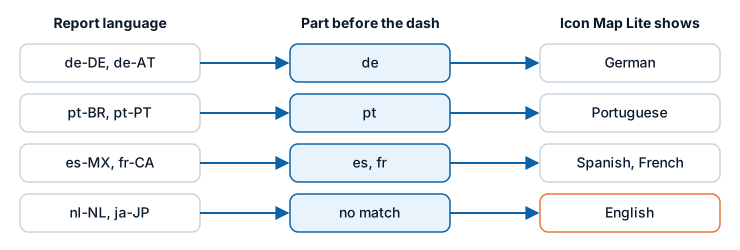
Icon Map Lite reads the language Power BI reports for the report. It uses only the part before the dash, so every regional variant of a supported language gets that language. A language with no translation shows English.
The language is read once, when the visual is created. If you change the language of Power BI, reload the report to see the visual follow.
To change the language Power BI uses:
- Power BI Desktop: File > Options and settings > Options > Regional Settings.
- The Power BI service: Settings > General > Language, or the language of your browser when the setting is left on the default.
What is translated
- The names and descriptions of the field wells in the Build pane.
- The cards, groups, settings and options in the Format pane.
- The map controls, their tooltips and the legend.
- Messages on the map, the start page, the license page and the "What kind of map are you making?" guide.
- The dialogs the visual opens, such as the upload window.
- Place names on the built-in world map. Country, city, sea and other names follow the same language. A place with no name in that language shows its own name, and mountain peaks always show their own names. There is no separate language setting for the map.
If one piece of text has no translation yet, that text shows in English and the rest stays in your language.
What is not translated
- Your data. Field values, tooltips and labels show whatever your report holds.
- Numbers and dates. These follow the browser or operating system settings, not the report language.
- A small number of labels and messages, which always show in English. Examples are the Straight / Rhumb and Shortest line shapes, the "Level" and "Layer" names in the Shapes (from files) settings, the note under Maximum data rows, the list of supported formats in the upload window, and the tooltips of the globe button.
Links to this documentation
When the visual opens a page on icon-map.com, such as a layer's guide, it adds the report's language to the link. The documentation opens in that language where a translation is published, and in English otherwise. You can change the language of a documentation page with the menu at the top of the page.