
Data Store and My Data
The Data store in the portal is where your organization's commercial data licenses live. Use it to pay a quote, see what you hold on My data, and renew or end each license.
Commercial datasets are chosen on the Explore pages of icon-map.com or in the catalog in Icon Map for Fabric. See Buying commercial data.
Data store
Open Data store from the portal menu. It has two tabs, Browse and My data.
- Browse the store opens the catalog, where you choose a dataset and select See prices and buy.
- My data summarizes what you hold, and which licenses end within 30 days.
- How a data license works explains terms, renewal, the catalog version and copies.
Data is always bought from Tekantis, by card or on invoice, and a paid Icon Map plan takes 30% off.
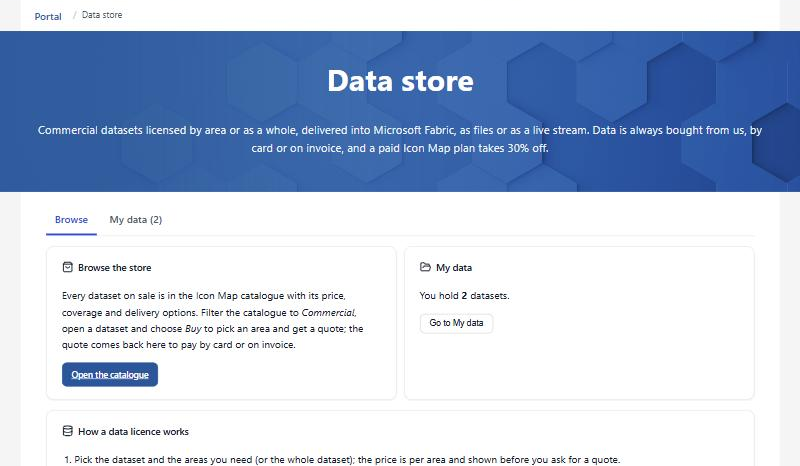 The Data store page in the portal.
:::
The Data store page in the portal.
:::
Review and pay a quote
When you continue a purchase in the portal, for example with Review and pay in the portal on icon-map.com, the quote opens on Review and pay:
- the data, the area and Term, with the price held until a stated date,
- Pay by card, or Pay by invoice where your account allows it. Paying by invoice asks you to confirm first: the order is placed and the license starts straight away, and the invoice is payable within 30 days.
Only an account owner or a license manager can buy data. If you want the purchase on your Microsoft invoice instead, ask us for a Marketplace private offer.
My data
My data lists every commercial data license your organization holds.
| Tile or column | Shows |
|---|---|
| Datasets you hold | How many data licenses the account holds |
| Needs action | Licenses that end soon or need a decision |
| Data | The dataset |
| Area | The whole dataset, or the areas you bought |
| Under the dataset | For an area: Preparing your area for a short while after you pay, then Ready to use from the catalog in Power BI or Fabric. If it could not be prepared, Could not be prepared: we retry automatically. Links in an Organizational Catalog are listed as Linked in that catalog, and copies (downloads, and any lakehouse copies made before October 2026) are listed one by one |
| Renews or ends | The renewal or end date |
| Status | Active, Ends soon, Ends in a number of days, Ended or Suspended |
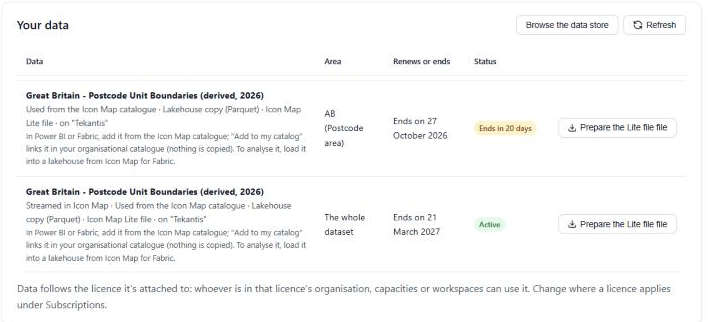 My data, with one license ending soon.
:::
My data, with one license ending soon.
:::
From My data you can:
- Renew, or Renew or end, a license that is ending.
- Cancel renewal. The license carries on until the end of the period you have paid for, then ends.
- Download the data as a Parquet file (the analysis format: shapes in
geometry_wktandgeometry_wkb, bounds inbbox_*, for a whole dataset or an area alike), and see when an update is available for your downloaded files. The version in the Icon Map Catalog, and every link to it, updates by itself.
Renew or let a license end
Open a license from My data to see when it ends. Then choose:
- Renew for 12 months, to keep using the data, or
- Let it end. Maps stop showing the data when the license ends, and so do links in your Organizational Catalog: there is nothing to delete for them. If the data license requires it, remove your downloaded files, and anything you loaded into a lakehouse from them, and select Confirm the data has been removed.
See Renewal and expiry for what happens on maps when a license ends.