

Icon Map for Fabric is built in two layers. The core product provides the mapping, layers, analysis tools and publishing, all running natively inside Microsoft Fabric against data you already manage there.
On top of this we are building a series of industry packs. These add functionality that only really makes sense for a particular sector, along with templates and reference datasets to give users a useful starting point.
One of the things we have been working on for the utilities pack is hydraulic modelling for water networks.
The idea is to take the asset data a water company already holds, including pipes, valves, hydrants and reservoirs, and turn it into a network you can actually run scenarios against. For example, what happens if this main bursts? Which valves need to be closed? Which properties lose supply? Can we rezone the network? Where would be the best place to connect a tanker?
For this example we used real open data published by Wellington Water in New Zealand. The asset data is theirs. We then generated the demand model, roughness assumptions and some of the additional scenario data required to make the network solvable.
The result is the report below.
The data
Wellington Water publish their network assets as open data, with the sensible caveat that it should not be used for detailed engineering design.
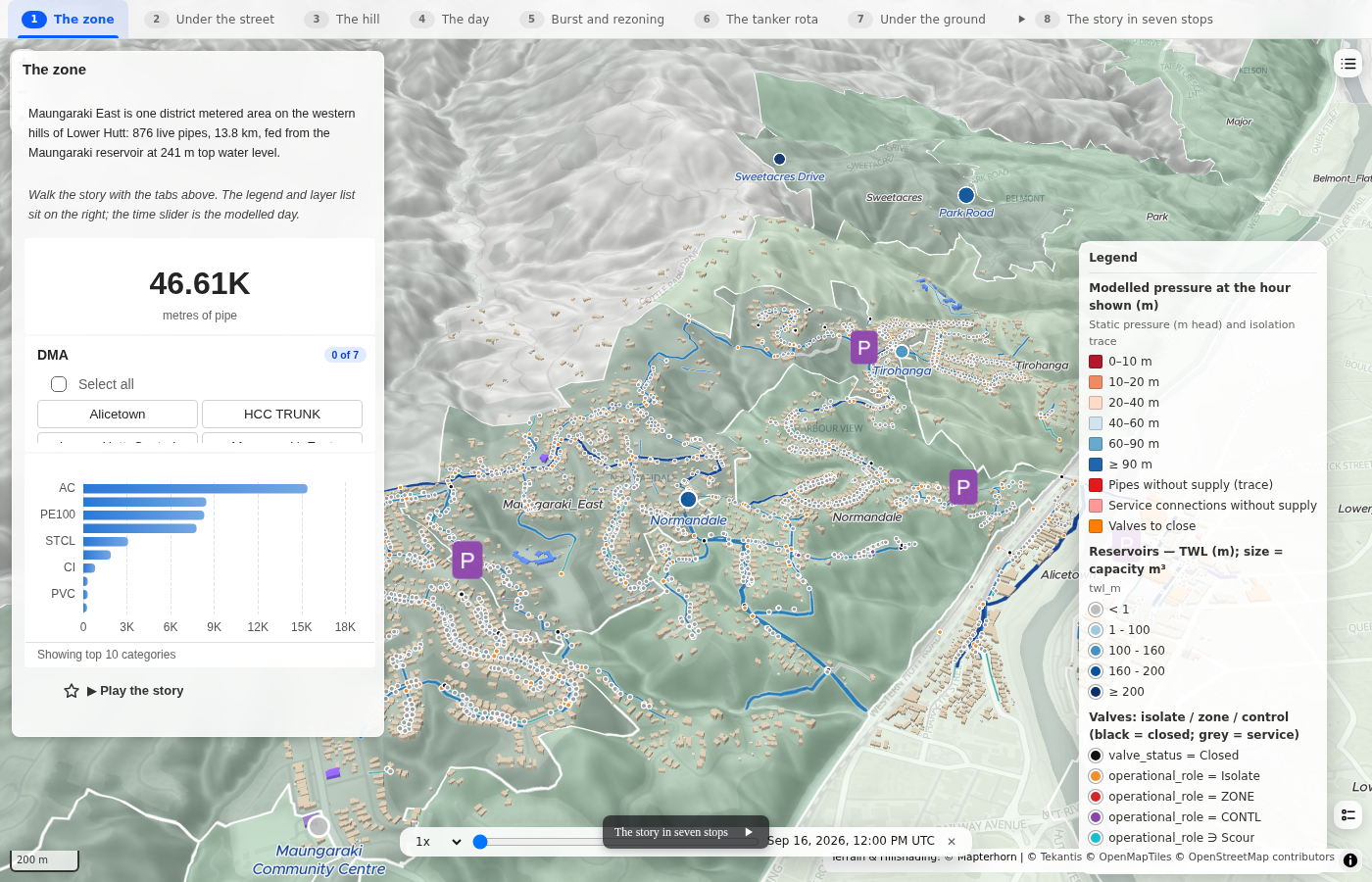
We picked one district metered area, Maungaraki East, on the western hills of Lower Hutt. It turned out to be a particularly interesting area because of the terrain. The zone is supplied from a single reservoir on the ridge with a top water level of 241 metres, while the streets drop away quite steeply below it.
From the open data we had:
- Around 2,900 pipes in and around the zone, including type, diameter, material and operational status. Within the zone itself there are 876 live pipes covering 13.8 kilometres.
- Around 2,000 valves, including their operational role, so we could identify isolation valves and normally closed zone boundaries.
- 227 hydrants, four pressure control valves and the reservoirs, including their top and bottom water levels and capacity.
- The water supply zone boundaries and the reservoir supplying each zone.
There were then a few things we needed to generate ourselves.
- Demand. There is obviously no consumption information in the public asset register, so for the purposes of the demo each service connection represents a property using 400 litres per day. We applied a typical residential demand profile with morning and evening peaks, along with an allowance for leakage.
- Pipe roughness. This is derived from the pipe material codes in the source data.
- Supply levels. These are taken from the zone and reservoir records.
- Buildings. These come from Overture Maps and are extruded by type, mainly to give some useful surrounding context in the 3D views.
One of the more interesting problems was actually building the network graph.
Only around eight per cent of the pipes have start and end node identifiers, while the valves and hydrants do not have them at all. That means the hydraulic network we need does not really exist in the source data.
We therefore build it automatically by snapping pipe ends together and attaching valves and hydrants to the nearest pipe based on their position.
It isn't perfect, and the report exposes where there is uncertainty, but I think this is quite important. Real asset data is rarely perfectly structured for the model you want to run, so being able to construct something useful from the data that actually exists is a big part of the problem.
The scenario
For the example, we created a burst on a residential street around halfway up the hill.
The idea was to replicate some of the questions a control room might want answered during the first part of an incident:
- Which valves need to be closed to isolate the burst?
- Which properties will lose supply?
- Can any of those properties be recovered by opening a boundary valve and supplying them from a neighbouring zone?
- Where should a tanker connect to restore supply to as many remaining properties as possible?
The report then works through these questions in sequence, using the network model rather than simply drawing a buffer around the burst location.
How the model works
There are two parts to the modelling.
The first is static head, which does not require a hydraulic solve.
This is simply the reservoir's top water level minus the ground elevation at each point, with the ground elevation taken directly from the terrain under the map.
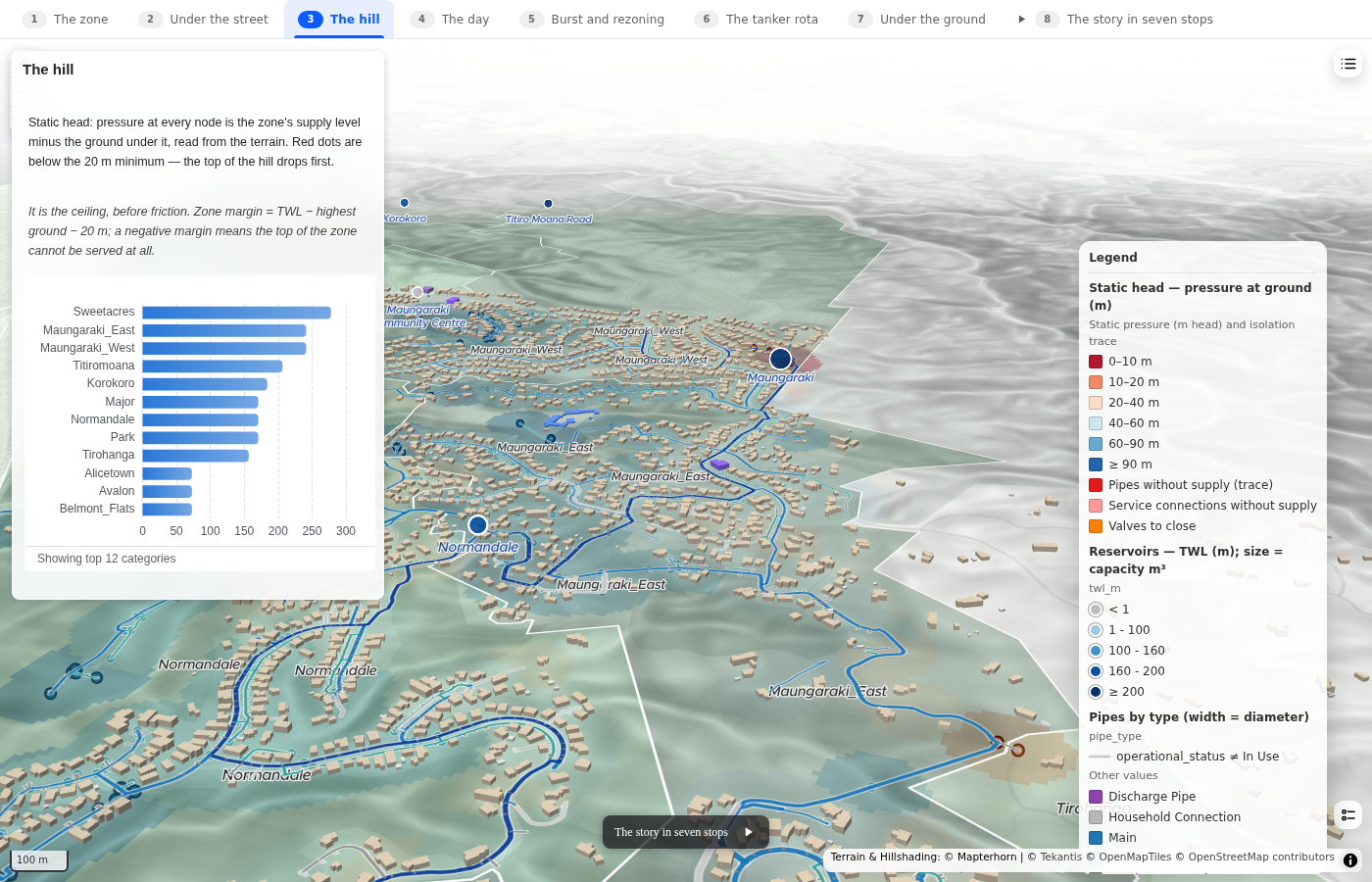
For a hilly zone like Maungaraki East this is useful straight away. The supply level is 241 metres and the highest ground in the zone is 240.7 metres. If we then assume a minimum pressure of 20 metres, you can immediately see that the upper part of the zone is potentially problematic.
The second part is the full hydraulic solve.
We run an EPANET-based solver directly in the browser. The network graph is converted into junctions, pipes, reservoirs, valves and demand nodes. Ground levels come from the terrain, roughness comes from the pipe material, service connections add demand to the network and the reservoir provides the fixed head.
Closed valves close the corresponding network links and pressure control valves are included where they exist in the source data.
The model solves a full 24-hour period in hourly steps. The report therefore has a time slider allowing you to move from the overnight minimum through to the morning and evening peaks.
Demand becomes pressure-driven below 15 metres. This is particularly important when modelling a burst or isolated area because, as pressure collapses, consumption also reduces rather than the model simply reporting increasingly unrealistic negative pressures.
We also show the assumptions being used directly in the report. With something like this I think that is essential, particularly when you are building a model from incomplete public data.
Scenario objects
One of the cleverest parts of our underlying Icon Map framework is something we call Scenario Objects. They are how we handle what-if modelling across the platform.
Rather than having to edit tables or create a completely separate version of the model, the things you want to test can simply be added to the map as scenario objects.
For the utilities pack these are things that make sense within a water network, for example:
- a tanker connected to a hydrant
- a new section of main
- a pump
- a valve
- a storage tank
- a reservoir
You place the object on the map, set the small number of parameters it needs, and the hydraulics module overlays it onto the existing network and solves the result.
We can then compare that result with the base network and, where appropriate, add a cost model as well.
Objects can also be grouped into named scenarios. This means you can build two different options and switch between them while seeing the impact on the network.
We are using the same idea across the other industry packs.
In the planning and environment pack, for example, scenario objects can be buildings, trees, ground surfaces or emission sources. Those objects are then picked up by whichever modelling engines need them, such as wind, shade, heat, noise or dispersion.
For the water module we wanted to follow exactly the same pattern. A tanker, new main or reservoir is simply another object placed onto the map which can then be consumed by the hydraulic engine.
Making it fast enough to click
A hydraulic model would not traditionally be something you expect to run interactively every time you click something on a map, so quite a lot of work has gone into making this fast enough to feel interactive.
There are a few important parts to this.
- The solver runs in the browser. EPANET is compiled to WebAssembly and runs alongside the map. There is no separate modelling server required.
- The network is assembled once and then reused. The relatively expensive work of turning the source asset data into a hydraulic network happens up front, rather than every time someone changes a scenario.
- Scenario changes are handled incrementally. Closing valves, adding a tanker or testing another intervention can be applied to the existing model and re-solved without starting again from scratch.
There is quite a bit more happening behind the scenes to keep this responsive. We cache and reuse work where possible, optimise how scenario searches are performed and minimise how much of the map needs to change when a new result comes back.
The end result is that fairly complex modelling feels much more like interacting with a map. You can click a valve, change a scenario or test an intervention and see the network respond almost immediately.
Importantly, because the hydraulic modelling itself runs directly in the browser, the underlying network data does not need to be sent to a third-party modelling service. It stays within the customer's existing Fabric environment and security boundary, keeping the whole process securely within their tenant.
The report
The final report has seven pages, shown as bookmarks in the tab strip. Each one focuses on a different part of the scenario, with its own text, charts and map layers.
We also added a camera tour which automatically flies through all seven pages, which works really nicely when presenting the scenario.
The zone
The first page shows Maungaraki East, the reservoir on the ridge and the pipes underneath the streets.
The pipes are coloured by type and their width represents diameter. There is also a chart showing pipe length by material and a zone slicer, both of which filter the map.
Under the street
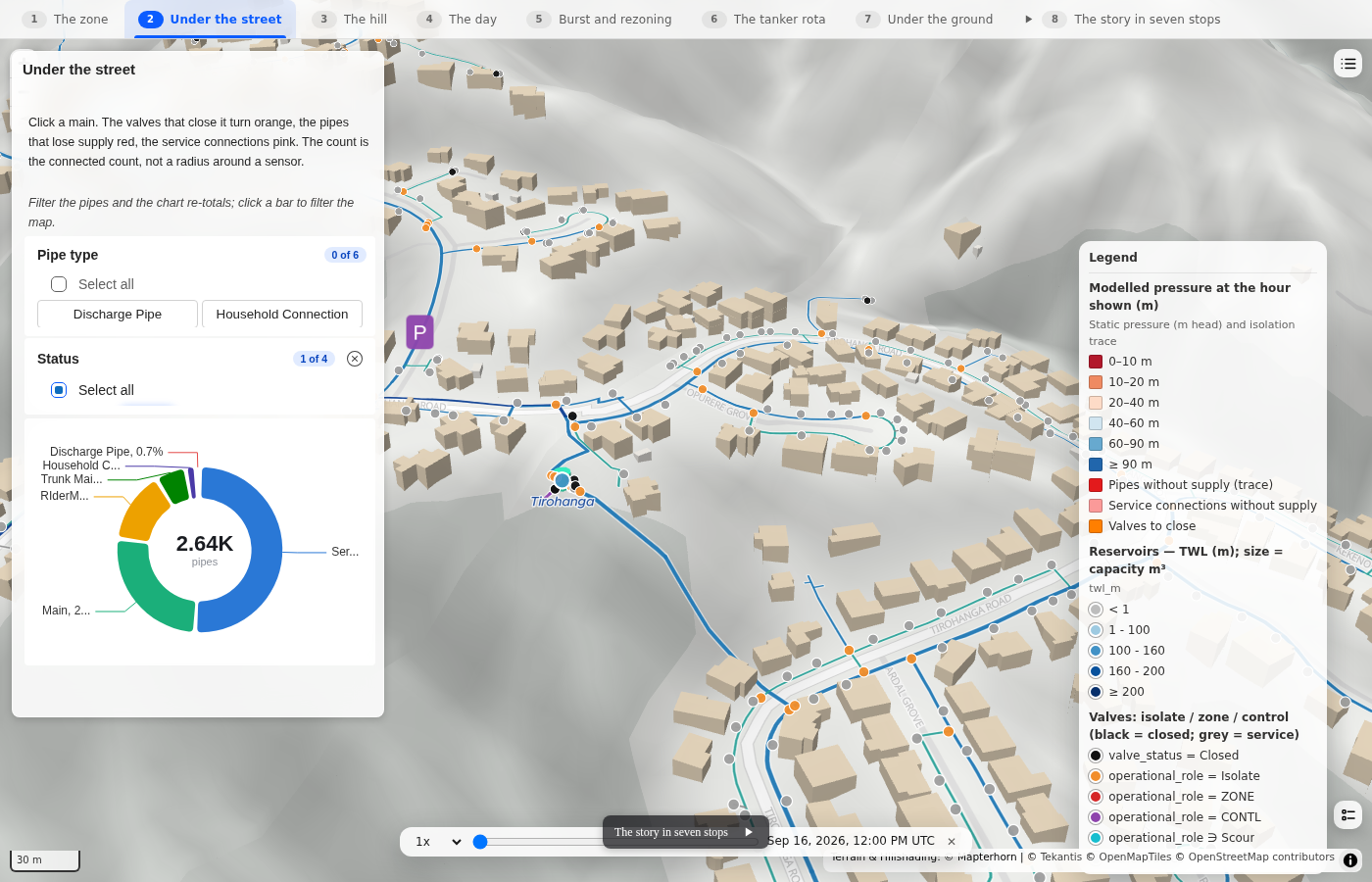
Click a main and the module runs an isolation trace.
The valves that need to close turn orange, the pipes that lose supply turn red and the affected service connections turn pink.
Importantly, the affected property count is calculated from the properties actually connected downstream of those valves rather than simply finding everything within a radius of the burst.
The hill
The next page shows static head across the terrain.
Each node is coloured by the available pressure before friction losses, with nodes below our assumed 20 metre minimum shown in red.
A bar chart compares the supply levels of neighbouring zones, while the 3D terrain makes it quite obvious why the upper part of this zone is difficult to supply.
The day
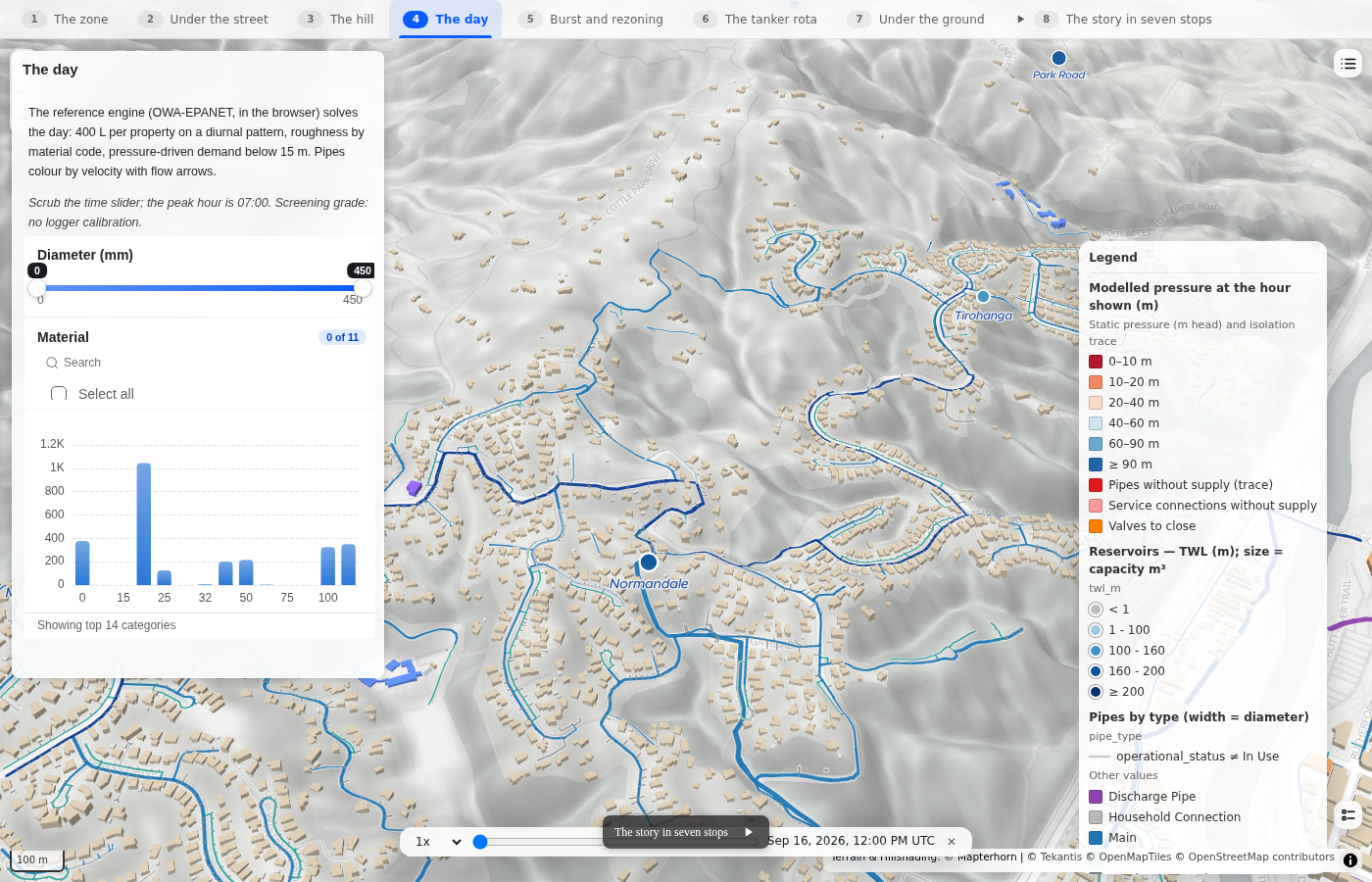
This page shows the full hydraulic solve.
Pipes are coloured by velocity and we animate a pulse along each pipe in the direction of flow. The pulse moves faster where velocity is higher, which makes it much easier to understand what the network is doing without having to click on individual pipes.
The time slider lets you move through the modelled 24-hour period.
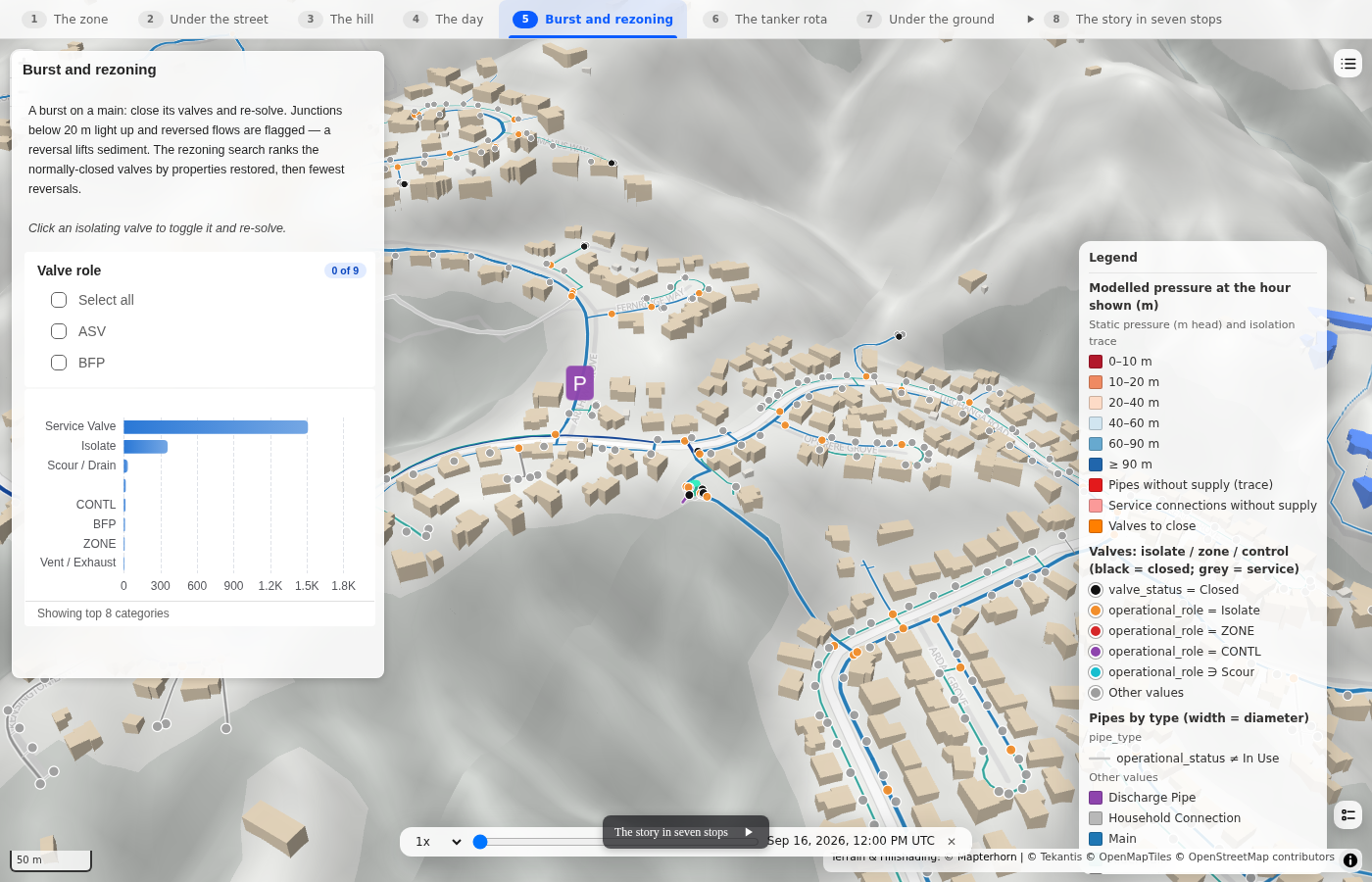
Burst and rezoning
We can then trigger the burst scenario.
The valves identified by the isolation trace are closed and the whole network is re-solved.
For the main used in this example, nine valves are closed and 53 properties lose supply at the morning peak.
We also identify pipes where the direction of flow reverses. This can be important because flow reversals can disturb sediment in older mains and potentially create a water quality issue.
The module then performs a rezoning search. It tries the normally closed boundary valves one at a time, re-solves the network and ranks the options based on the number of properties restored and the number of flow reversals created.
You can also click any of the isolation valves directly on the map to open or close it and immediately re-solve the network.
The tanker rota
This is probably my favourite part of the demo.
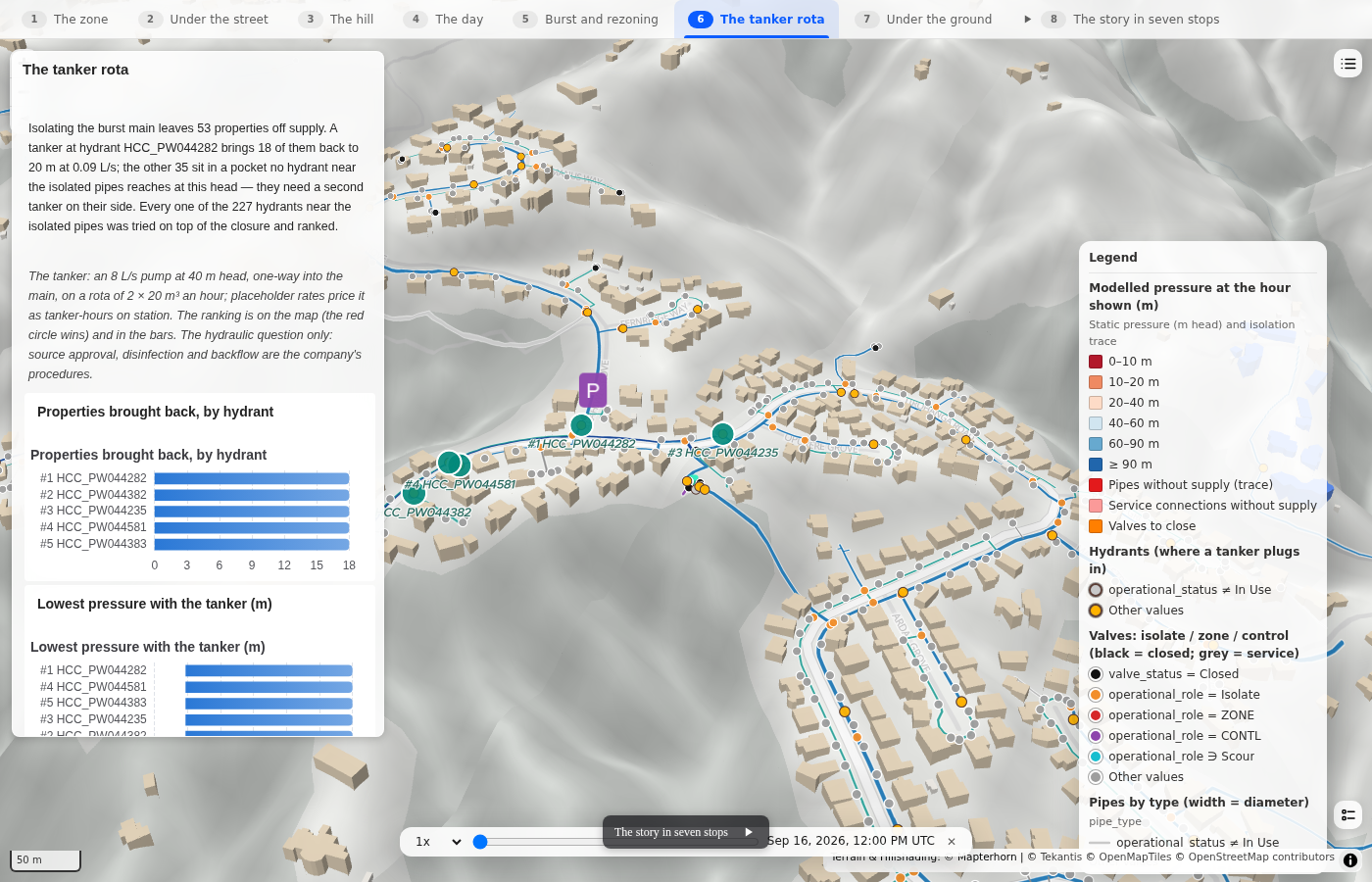
With the burst still isolated, we add a tanker as a scenario object. For the example it is modelled as an 8 litre per second pump at 40 metres head, supplied by 20 cubic metre tanker loads operating on a rota.
The module identifies hydrants close to the isolated section and tries connecting the tanker to each one in turn.
For every candidate it re-solves the network and measures how many properties return to more than 20 metres of pressure.
The hydrants are then ranked automatically.
In this example the best hydrant restores supply to 18 of the 53 affected properties.
The remaining 35 are in a pocket that no hydrant within 80 metres of the burst can reach at the modelled tanker head. That is also a useful result because it suggests a second tanker would need to be positioned on the other side of the isolated network.
The candidate hydrants are shown directly on the map and in the ranking chart, with the best option automatically shown as the active scenario.
Under the ground
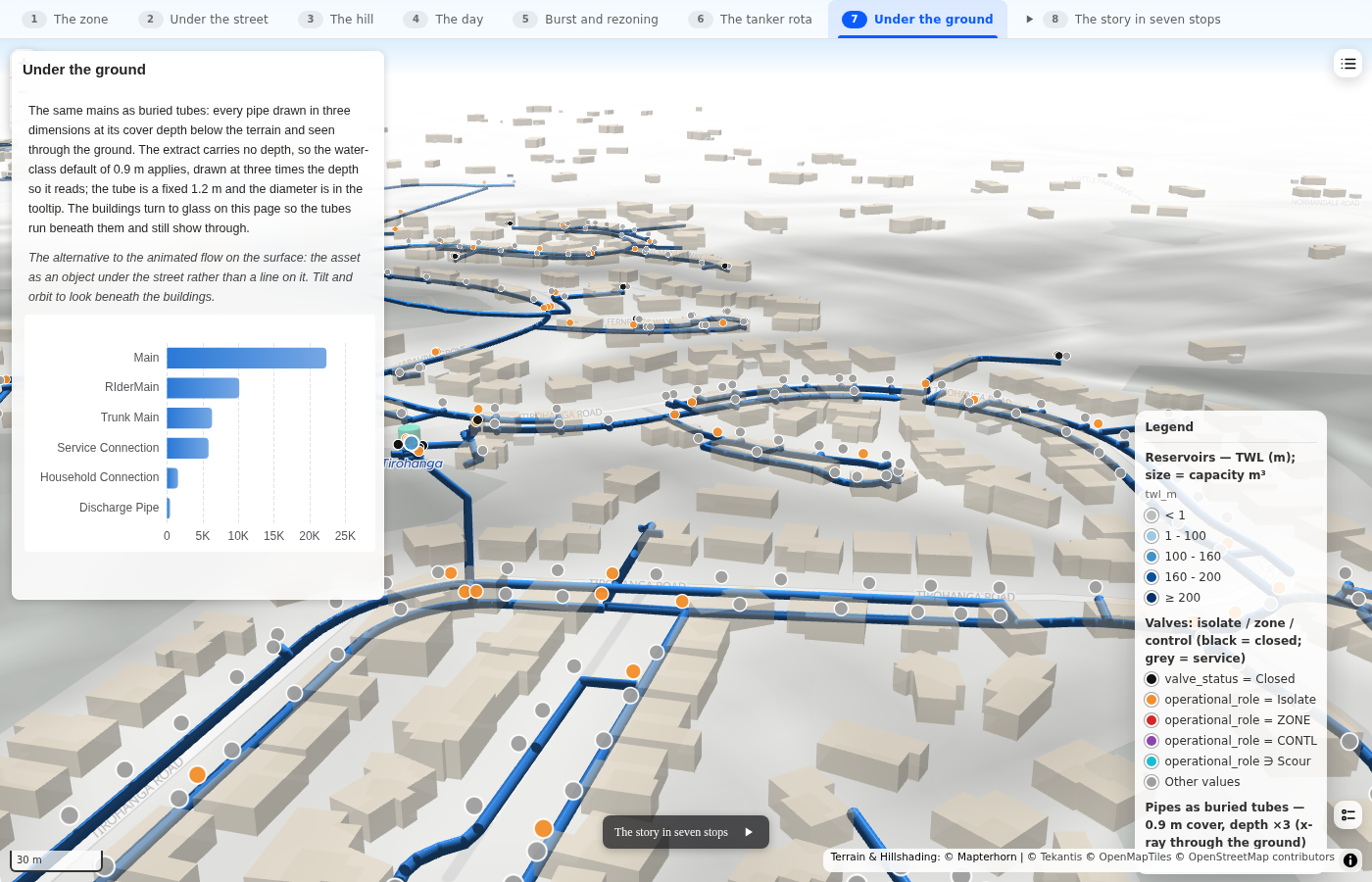
The final page switches into an underground view.
The same mains are shown at their assumed cover depth beneath the terrain, while the buildings become transparent so you can look underneath them.
It gives you an x-ray style view of the utility network and is a nice way to finish the report.
Where this is useful
It is important to be clear about what this particular example is and is not.
This is a screening-grade model built from open data. There is no logger data available for calibration, pipe roughness has been estimated from material codes, pipe depths are assumed and the demand model is generated rather than based on metered consumption.
You would not use this example to size a new main or replace a properly calibrated engineering model.
That does not mean it isn't useful.
What interests me is everything that sits before or around the detailed engineering study.
You might have forty potential schemes and want to understand which five are worth detailed modelling. You might want to get an initial view of the impact of a burst while an engineer is travelling to site. Or you might need to explain a network pressure problem to people in a meeting who are never going to open a specialist hydraulic modelling package.
Because this is running directly against the asset data held in Fabric, you can do that without exporting the network into another system or creating another copy of the data to manage.
It also means the hydraulic result can sit alongside all of the other operational, customer, financial and spatial data already available within the organisation's data platform.
For me, that is the interesting bit. We are not trying to replace the specialist engineering tools. We are making some of this modelling available much earlier in the process and to a much wider group of users.
Icon Map for Fabric is currently in private preview and we are continuing to build out the utilities pack.
If you operate a water network and would like to try this against your own asset data, or you have network data that is not quite in the perfect state a hydraulic model expects, we would be very interested to see what we can do with it.
For more information or a chat please email us on support@icon-map.com.
Network data: Wellington Water open data, data-wellingtonwater.opendata.arcgis.com, not for detailed engineering design. Buildings: Overture Maps Foundation and OpenStreetMap contributors.