
Buying a License
The Icon Map Pro licensing portal supports several commercial models, allowing organisations to choose the option that best fits their procurement route, deployment scenario, and expected usage.
When purchasing a licence, the appropriate flow will depend on whether you are evaluating the product, licensing for individual users, or supporting large scale enterprise or embedded deployments.
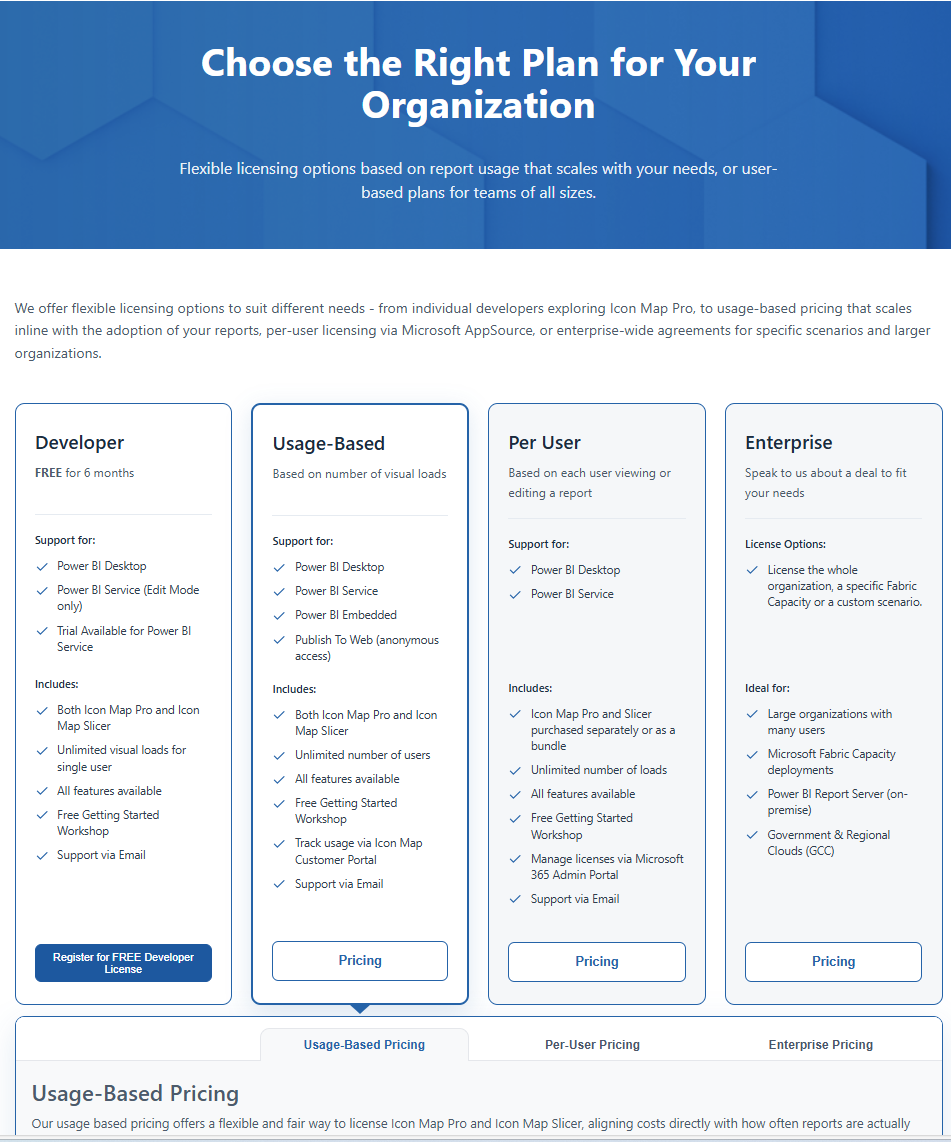
Developer Plan (Free 6 Month License)
The Developer Plan is intended for early stage evaluation, testing, and development work.
It is ideal if you are exploring Icon Map Pro before committing to a commercial subscription.
This plan supports:
- Power BI Desktop for report development
- Power BI Service in edit mode for testing within a workspace
Developer licences are requested directly through the portal using the Developer Licence request flow. You can also request a 2 week publish trial once you are ready to share what you have built.
Usage Based Plans
Usage based plans are designed for organisations that need flexibility, scalability, or licensing based on consumption rather than named users.
These plans are purchased through the portal using Paddle checkout, with pricing that scales according to:
- Credit tiers
- Quantity (for certain tiers)
This model is best suited for:
- Large organisations with many viewers
- Embedded Power BI scenarios
- Variable or unpredictable usage patterns
Usage plans can be purchased and managed directly within the Portal.
Per User Plans (Microsoft AppSource)
Per user plans provide predictable licensing based on the number of named Power BI users.
These subscriptions are purchased directly via Microsoft AppSource and assigned and managed within the Microsoft 365 Admin Centre.
Key features include:
- Fixed, user based pricing
- Subscription management handled entirely by Microsoft
- Billing history available within Microsoft, rather than in this portal
Enterprise Licensing
For enterprise agreements, regulated environments, or special deployment requirements, Icon Map Pro offers an Enterprise licensing route.
This option is suitable for:
- Organisation wide agreements
- Government or restricted cloud environments
- Custom commercial arrangements
To proceed, select the Enterprise option in the portal and contact the Icon Map team for direct support.
Purchasing in the Portal (Usage Based)
Currently we only support usage-based purchases directly in the portal. In the future we plan to add support for licensing models such as enterprise, capacity-based, and report server plans. Until then please contact sales@tekantis.com for more details.
:::note Per User Licensing Purchasing user-based licences must currently be done within the Microsoft AppSource Marketplace, as the assignment of user licences is managed by Microsoft in their standard 365 Admin Portal. If for any reason you cannot purchase via this route, for example you need to use a reseller, please reach out to sales@tekantis.com as we can offer an alternative in some instances. :::
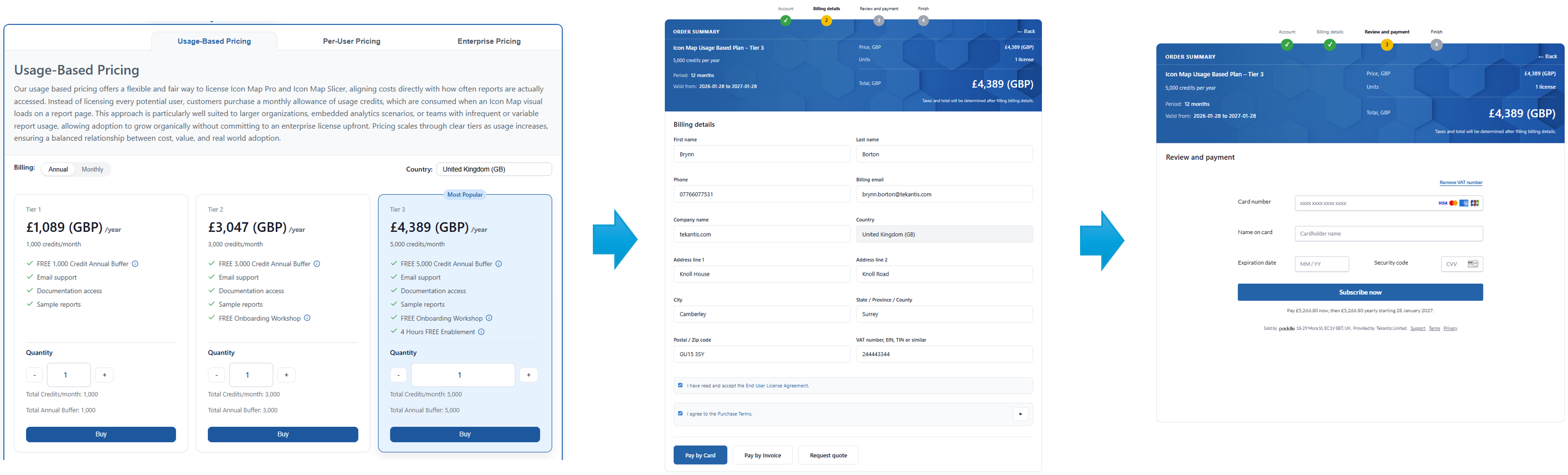
The portal provides two methods to pay for the licences.
Pay by Card
Simply:
- Select your desired usage-based plan and quantity.
- Make sure you have the right country selected - this will default to your billing profile country if you have already set this up.
- Click Buy.
- Complete Billing Details and accept the EULA and purchase terms.
- Click Pay by Card to open the Paddle checkout.
- Enter your card details and complete the purchase.
- After successful payment, click Finish to view your licence and subscription details - these will be active immediately.
Pay by Invoice (Approval Required)
If you are unable to pay by card for any reason you can request the ability to pay by invoice over wire transfer. To do this, click Pay By Invoice - you will see a simple approval form, complete the details and we will review and enable it for you if you meet the criteria.
If this is the first time, the portal will show a Request invoice payment form where you:
- Confirm eligibility statements
- Provide a reason for paying by invoice
- Submit a request for review
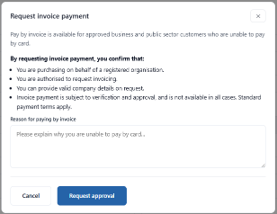
Once approved, you'll be able to confirm invoice payment by clicking the same Pay By Invoice button. This takes you to a confirmation screen where you can optionally provide a purchase order number before confirming the purchase.
The licence will be enabled and usable immediately. You will then receive an invoice from our payments provider Paddle.com.